Start a Conversation
Menu

Check What Your Marketing Reports Can Show

Marketing
Analytics

Start with a tracking gap, reports that disagree or a question about lead quality. We review conversion tracking, calls and forms your team received, and the outcomes your records can confirm.

Two people looking at a sheet of paper beside a laptop

Check the Records 
Choose the Next Step

Compare Spending With Recorded Outcomes

Compare campaign costs with received inquiries and confirmed sales where records support a match.

Check Tracking and Reporting Gaps

Check which actions were recorded, which requests arrived and which inquiries met your criteria.

Choose Your Next Move

Use the records to decide whether to fix tracking, review inquiry fit or reconsider spending.

When Ads, Website and Sales Reports Differ

What Does Each Report Count?

Your ads show conversions. Your website shows traffic. Your sales team tells a different story. Which view should guide your next investment?

If your cheapest inquiries never become customers, the lowest cost per lead can point you in the wrong direction.

Check which received inquiries can be matched to a source

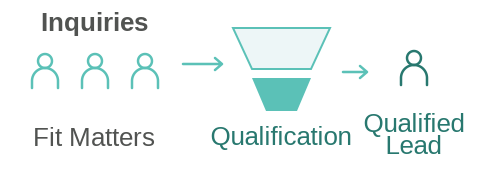
Separate lead volume from lead quality

Choose whether to check tracking, inquiry handling or sales records

Talk Through Your Tracking Gaps →

Tell us about one tracking or reporting concern. A brief example can help if you have one.

Received Inquiries Missing From Reports

A call or form can appear as a tracked action without reaching your team. A genuine inquiry can also arrive without appearing in the report. Check both records.

Our Focus: Test an agreed call or form action. Check whether it reached your team and whether the report recorded it.

Overlapping Platform Credit

Two reports can assign credit to the same inquiry or sale. Adding their figures can count the same outcome twice.

Our Focus: Compare the reporting rules and dates. Match credited outcomes to business records where possible and count each verified sale once.

Leads That Do Not Fit

Inquiries increase, but some requests fall outside the services, areas or timing your team can support.

Our Focus: Bring qualification and sales feedback into the review.

Clicks Without Sales Context

Website reports show visits and actions. Use business records to check which inquiries arrived, which became opportunities and which became sales.

Our Focus: Review marketing activity alongside your sales records.

Start With One Measurement Question

What Do You Need Your Reports to Explain?

Tell us where your reports stop helping. Start with a tracking gap, a lead quality question, or a decision about your next investment.

Discuss Marketing Analytics →

From Marketing Activity to Business Records

Compare Campaign, Website and Business Records

Use campaign and website reports to check recorded activity. Use business records to verify which requests arrived, which fit and which became sales. Match the records where reliable information allows.

Paid Search

Organic Search

Social

Email

Website Actions

Recorded phone clicks, form events and other configured actions

Qualified Leads

Received inquiries that meet your team’s agreed fit criteria

Opportunities

Inquiries your team has accepted as sales opportunities

Confirmed Sales

Completed sales and any recorded revenue

Sales Feedback → Review Inquiry Fit → Choose What to Check Next

Paid, organic search, and CRM circles overlap around one customer journey

Attribution With Context

One Customer. Several Touchpoints.

A search, an ad and a later conversation may all show up in records for one sale. Check which touchpoints each report can observe and which entries refer to the same sale.

Consent choices, offline conversations, and incomplete records can leave gaps. We explain what the evidence supports and where uncertainty remains.

From Reporting to Decisions

Compare Ad Spend per Inquiry and per Qualified Inquiry

In this planning example, Campaign A has lower ad cost per inquiry. With the same fit criteria applied to both campaigns, Campaign B has lower ad cost per qualified inquiry.

What the Comparison Supports

Campaign B Has a Lower Ad Cost per Qualified Inquiry

Before changing the budget, compare confirmed new customers from comparable inquiry groups and allow each group the same time to buy. Use costs and customer value from those same groups, and consider your team’s capacity.

Define what makes an inquiry qualified

Compare cost per qualified inquiry using the same definition

Check customer outcomes before changing the budget

Discuss Your Reporting Goals →

Hypothetical Planning Example. Not Client Results.

Compare Cost per Qualified Inquiry.

Campaign A

Same Spend: $3,000

120 Inquiries

12 qualified inquiries

Campaign B

Same Spend: $3,000

60 Inquiries

30 qualified inquiries

Cost per Inquiry

Cost per Qualified Inquiry

For this planning example, divide ad spend by all inquiries to find cost per inquiry. Divide the same spend by the inquiries that meet the shared fit criteria to find cost per qualified inquiry.

Marketing Analytics Services Built Around Your Question

What Does the Evidence Support?

Start with a decision, then examine the records needed to make it. When information is missing, the next useful step may be fixing measurement or reviewing inquiries with your team.

01

Can We Trust the Records?

Check that the agreed actions are recorded correctly. Review duplicate events and repeat contacts separately. Use the same definitions, sources and reporting periods.

If evidence is missing: Compare call or form delivery records with the tracked events. Check for actions that were missed or recorded more than once.

02

Which Inquiries Fit?

Agree on the service, location or other criteria that make an inquiry a fit. Apply them to genuine received inquiries counted once, and record cases your team has yet to review.

If evidence is missing: Review recent inquiries with the people who follow them up.

03

Who Becomes a Customer?

Use business records to confirm new customers, completed sales and recorded revenue. Compare the same source, inquiry group, period and outcome cutoff before reviewing acquisition costs.

If evidence is missing: Agree who records each stage. Keep cases with an unknown sales outcome separate from confirmed sales with missing revenue.

04

What Is the Next Useful Step?

Enough evidence: Agree who will make the change, which result to check and when to review it. Use a suitable test if the decision depends on what the change caused.

More evidence needed: Choose one bounded check, such as reviewing recent inquiries. Lower lead cost alone does not establish better profit.

Work This Could Involve

We assess your existing tools and agree which changes are useful and practical before implementation.

Review Tracking and Inquiry Delivery

Review GA4 key events, Google Tag Manager and ad conversion actions. Check whether test calls and forms reach the intended team and appear in the agreed reports.

Compare Campaign, Inquiry, and Sales Records

Check whether campaign records can be matched to inquiries, sales stages and outcomes using shared identifiers and approved access. Review how reports assign credit and include cost or sales data where reliable.

Agree on Reporting and Next Checks

Reporting dashboards, including Looker Studio where suitable, and ongoing recommendations if included in the scope.

Our Analytics Process

Agree on What to Check and Who Will Do the Work

A project can follow these stages, with tasks and outputs defined in the agreed scope.

01

Audit

Identify the decisions your current reporting cannot support.

Output: Measurement Priorities

02

Implement

Set up the agreed events and test whether each records the intended action. Check delivery for any call or form routes in scope.

Output: Tracking Checks and Remaining Gaps

03

Connect

Compare campaign, website, and sales records where access and matching fields support the connection. Keep unmatched records visible.

Output: Matched Records and Known Gaps

04

Interpret

Explain patterns, gaps, and business implications.

Output: Prioritized Findings

05

Improve

Agree on the next change and review what happened.

Output: An Action Plan

Search Visibility Review

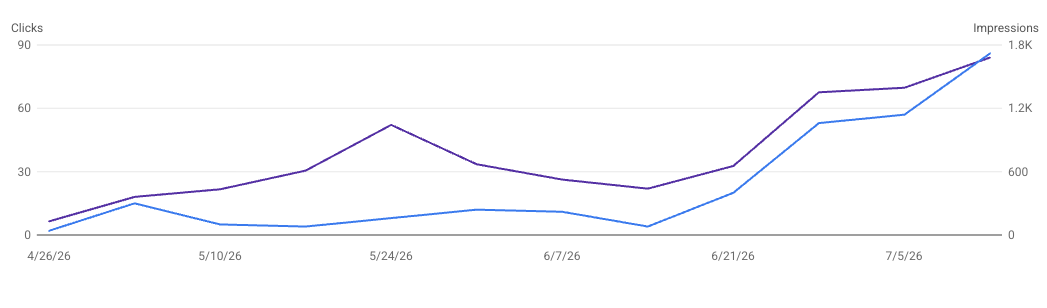
Search clicks and impressions plotted from late April through July 2026

Search Console counts impressions and clicks in Google Search. Google Analytics groups recorded site activity into sessions.

Acquisition by Channel

Monthly website sessions separated by search, direct, referral, and other channels

Open either chart to inspect its source labels and reporting period.

Reading Search and Website Reports

What Should You Check When the Numbers Change?

A change in a chart can give you a question to investigate. Check the report definitions and dates, then use business records to see whether inquiries or sales also changed.

01

What the Data Shows

The search chart plots clicks and impressions on separate axes. The sessions chart shows how sessions by channel vary across months.

02

What We Need to Understand

Check whether the available page, query or channel data helps explain the pattern. Use receiving records and team feedback to see whether inquiry volume or fit changed.

03

What to Check Next

Check date ranges, time zones, channel definitions, and exclusions before comparing reports. Use business records to verify receipt, fit, and sales where they can be matched.

The Working Relationship

Agree on the Work Before Changing the Tools.

Start with one question. Revenue Surge brings over 20 years of professional experience across marketing and websites. We agree on what to review, who handles each task and who approves changes before work starts.

Before: A Broad Concern

Can We Connect Clicks to Customers?

Ads: Clicks

Website: Recorded Contact Actions

Sales: Customers

Start with one question. A short description of the report can help. Leave out customer details. We can discuss account access after agreeing on the work.

After: Agreed Scope

Agree on Who Checks, Changes and Approves the Work

Question

Evidence

Action

Revenue Surge: the agreed review and recommendations, plus any approved implementation included in scope

Your team: qualification rules, sales feedback, and approvals

Together: access, outputs, timing, and the next review

Client Perspectives

Client Experiences With Website and Marketing Work

Clients and partners describe working with Revenue Surge on websites, marketing and project support.

Dave provided a solid resource and “home” for my clients that needed direction and counsel on how to maximize their digital efforts from digital media strategies, SEO/SEM and optimal website/landing pages that convert...

John Bosacker

Lee MMS

Dave did a great job and even redesigned our website. He is always available to answer any questions and is a valuable member to our team...

Justin Henson

Dave and his team never cease to amaze us with completion of every item on a Scope of Work as well as offering many additional services with fair pricing...

Lori Zeller

THOR Associates

Data and Marketing Analytics FAQs

Tracking, Reporting, Costs and Account Access

Understand the setup, reporting, and practical limits before you start.

What Does Your Marketing Analytics Service Include?
We start with the marketing decision you need to make and the information available. The agreed work may include tracking review, reporting, lead quality analysis, or implementation. Goals, outputs, responsibilities, and support are agreed before work begins.
Can You Review Our Existing GA4 and Tracking Setup?
Yes. A review can check configured GA4 key events, event definitions and reporting gaps. Where you authorize testing, compare form or call events with requests your team actually received. Agree on any fixes or new setup before implementation.
Can You Combine Data From Different Marketing Platforms?
Start by comparing what each platform counts, the reporting period, time zone and attribution rules. Check which records can be matched without counting the same outcome twice. Available permissions, consent and data quality determine which connections the agreed work can include.
Can You Connect Marketing With Our CRM?
We assess your CRM, source fields, lead stages, and sales records before agreeing on a connection. Missing identifiers or inconsistent sales updates can limit what can be matched. An integration should answer a useful business question.
Will Reports Show Lead Quality and Revenue?
Use agreed fit criteria to review genuine inquiries your team received and counted once. Verify bookings, sales and revenue separately in business records. Compare costs and confirmed customers within the same acquisition group, period and outcome cutoff. Report unknown outcomes separately.
How Often Will We Receive Reports and Recommendations?
The reporting schedule and review process depend on the agreed work and the time needed for meaningful evidence. A review should explain relevant changes, limitations, and the next useful check.
What Do You Need From Us to Get Started?
Start with one tracking gap, report discrepancy or lead quality question. A website link or brief example without customer details can help. We discuss account access after agreeing on the work.
What Affects the Cost and Timing?
The number of sources, access to existing accounts, tracking problems, implementation needs, and the condition of your sales records affect the scope. Sales delay can also affect when outcomes can be reviewed. We discuss these factors before agreeing on cost and timing.
Can We Begin Without a CRM or Perfect Tracking?
Yes. Useful starting information may include existing reports, inquiry records, and feedback from the person handling sales. The first priority may be consistent record keeping or a focused tracking repair. A CRM is not a prerequisite for an initial conversation.
Who Handles Implementation and Sales Feedback?
We agree on which tasks Revenue Surge will handle and which require your team or another provider. That can include website changes, tracking configuration, reporting connections, approvals, and sales updates. Your team remains responsible for its business decisions.
How Are Account Access and Handoff Handled?
Agree who owns the accounts, which permissions the work requires and who approves changes. Give access through named accounts and decide which settings, documentation and reports the business keeps at handoff and when access can be removed.
Can Analytics Prove Which Channel Caused Every Sale?
No. Attribution assigns credit using a model and the records available. Consent, missing identifiers, offline activity, and sales delay can leave gaps. A suitable comparison or experiment can help estimate what the campaign added. Profit requires separate cost and revenue records.

Reporting and Measurement

Get Answers Your Reports Can Support

Tell us about one report, tracking or lead quality concern. A page link or short example without private customer information can help us decide what to check first.