Start a Conversation
Menu

Build or Redesign a Website for Structured Content

Programmatic
Websites & SEO

Start with one question about a library, directory or publication you want to build or redesign. We can discuss which content should share a layout and what your team needs to publish, review or update.

Two people looking at printed page layouts and a branching diagram on a table

Content Records 
Shared Page Layouts

Reuse Layouts Across Related Pages

Create large content sites with reusable page systems.

Content Separate From Design

Keep article text and page data in organized CMS fields.

Update the Design Centrally

Improve shared layouts across the pages that use them.

Large Content Websites, Built Programmatically

Give Your Content Library a Structure Editors Can Maintain

We can build common fields and templates for guides or other pages that share a structure. Your team edits each record in the CMS. A change to the shared design can affect every page assigned to it, so we agree which pages to preview and check.

Website development gives editors a system for organizing, reviewing and publishing pages. Programmatic SEO helps plan which pages can serve distinct search needs and how people find them. Revenue Surge brings over 20 years of professional experience to the work.

Test the Workflow with One Approved Guide

Use a real guide to test the fields, layout, import rules, editor workflow, and URL decisions before expanding the same approach.

Structured Content → Shared Templates → Complete Pages

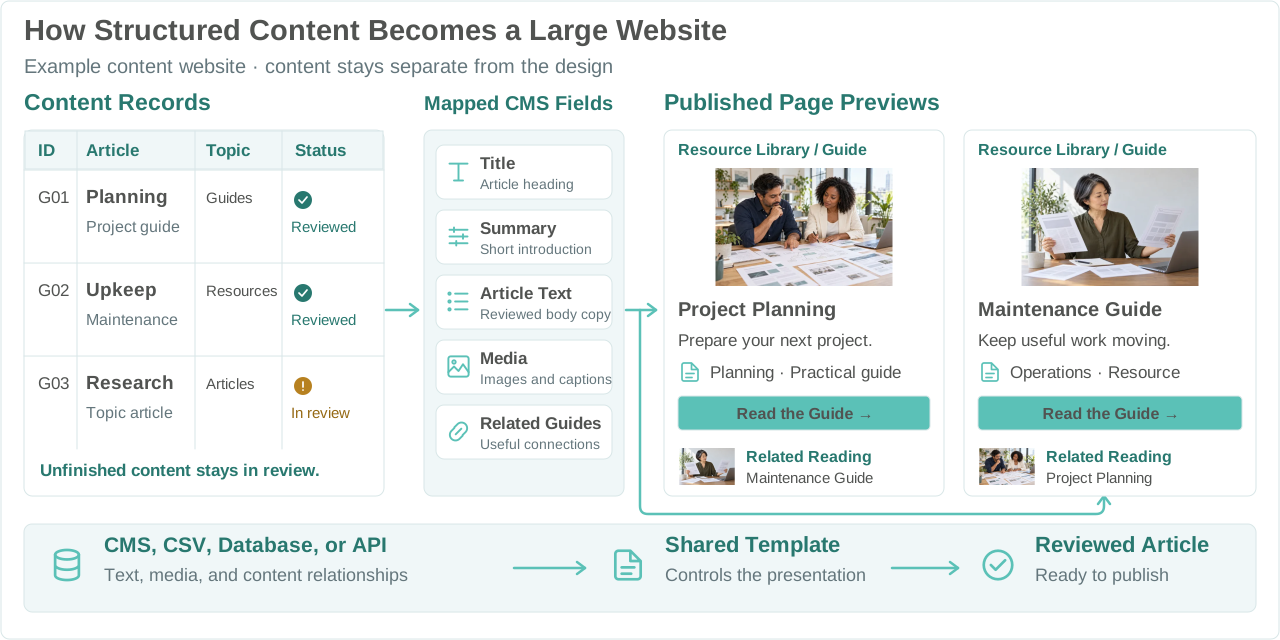
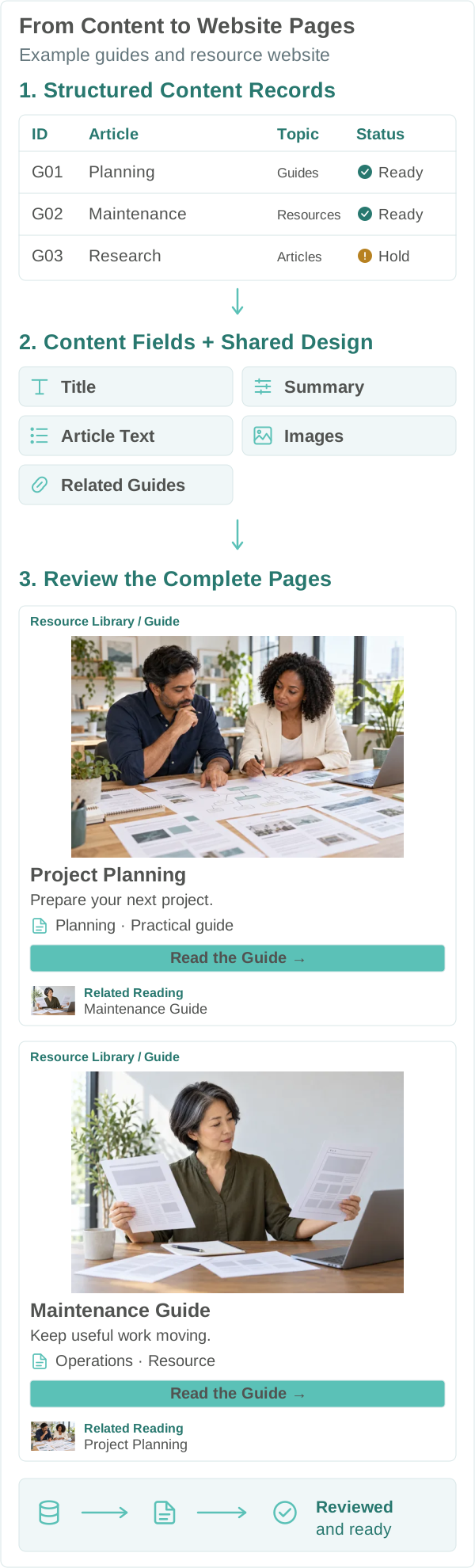
How Records and Templates Become Website Pages

The information belongs to a content record. Its assigned template handles the page design. We also define how records are matched, what an update may change, and when a page is ready to publish.

Content records mapped to CMS fields and two reviewed website pagesContent records mapped to CMS fields and two reviewed website pages

Model the Content and Its Owner

Identify the source, required fields, related records, and who approves the information.

Match Records to Their Pages

Use a stable source identifier to check whether an incoming record matches an existing CMS record. Set the URL rules separately for new and updated pages.

Preview the Finished Change

Preview the pages affected by a change. Hold incomplete new records and updates, and keep the last approved page live when an update is held under the agreed rules.

The diagram explains the publishing model. The worked examples below show the decisions needed to make it maintainable.

Content and Design, Separately Managed

Update the Shared Design
Use Existing Content Where It Fits

Review the existing fields and page templates before redesigning a library. Compatible fields can carry approved text into the updated template. Preview assigned pages and check whether new fields or migration work are needed.

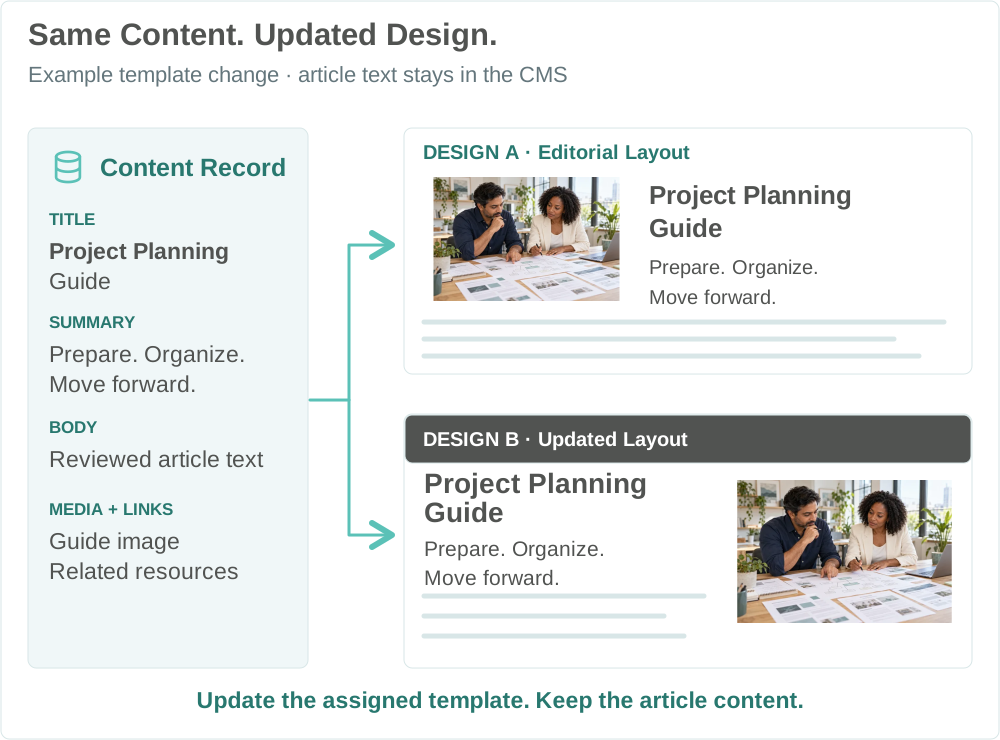
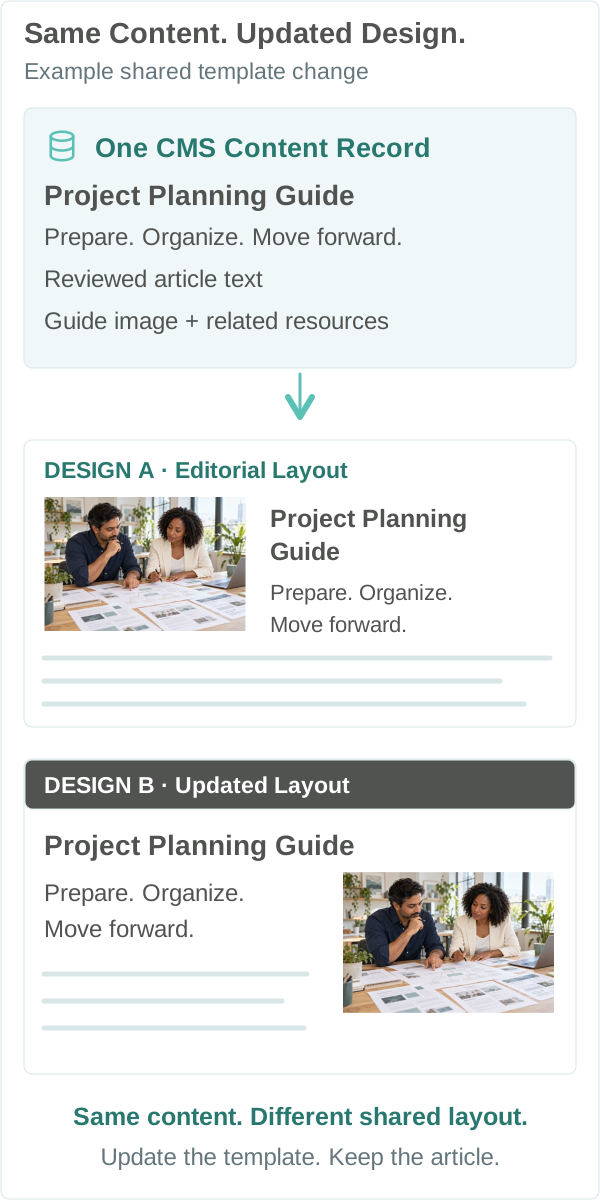
Update the Shared Layout

Revise an article header, typography, or related reading layout in the template. Its assigned pages can adopt that change together.

Retain Approved Content When the Fields Support It

Keep approved article text where the model supports it. Review any new fields and existing URLs before migration. Where pages move or combine, define the corresponding redirects and update the links.

One content record supplies two shared page designsOne content record supplies two shared page designs

Changing a template and migrating a website are different scopes. Agree what stays, what changes, and what needs testing.

See the Work Behind a Shared Update

Which Pages Need Review Before a Change Goes Live?

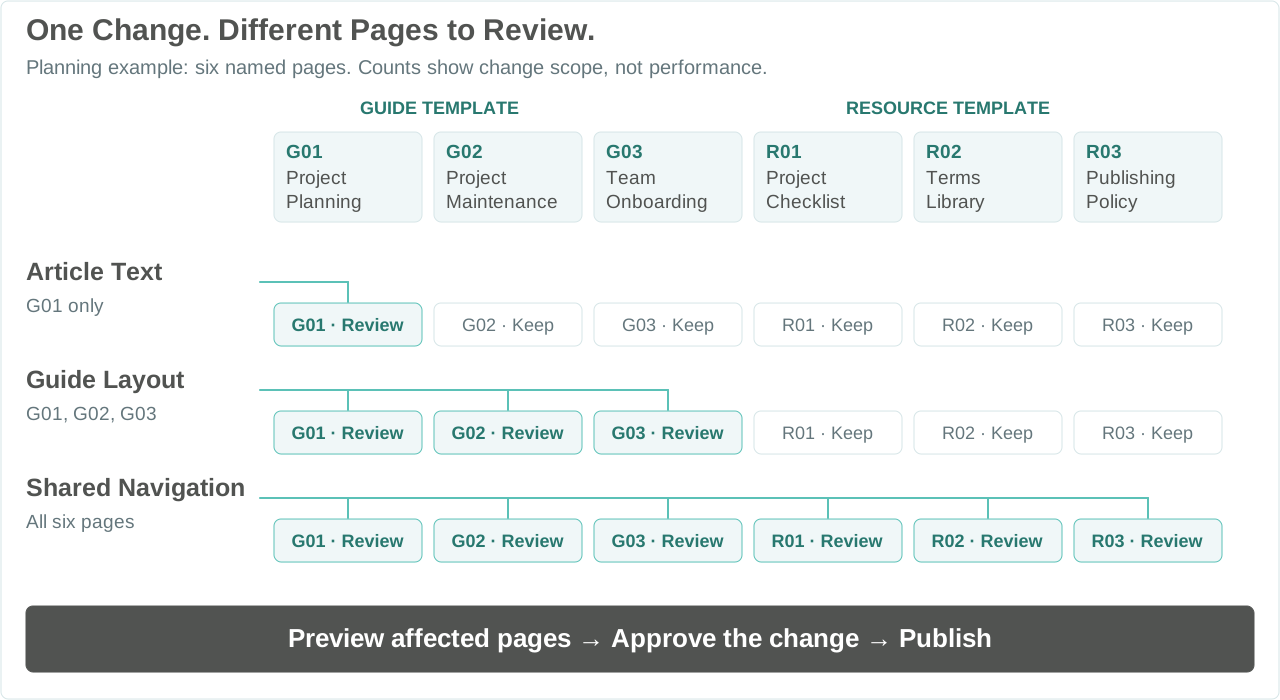
Correcting an article, redesigning a guide, and changing navigation reach different parts of the website. We plan those relationships so your team can review the right pages before a shared change goes live.

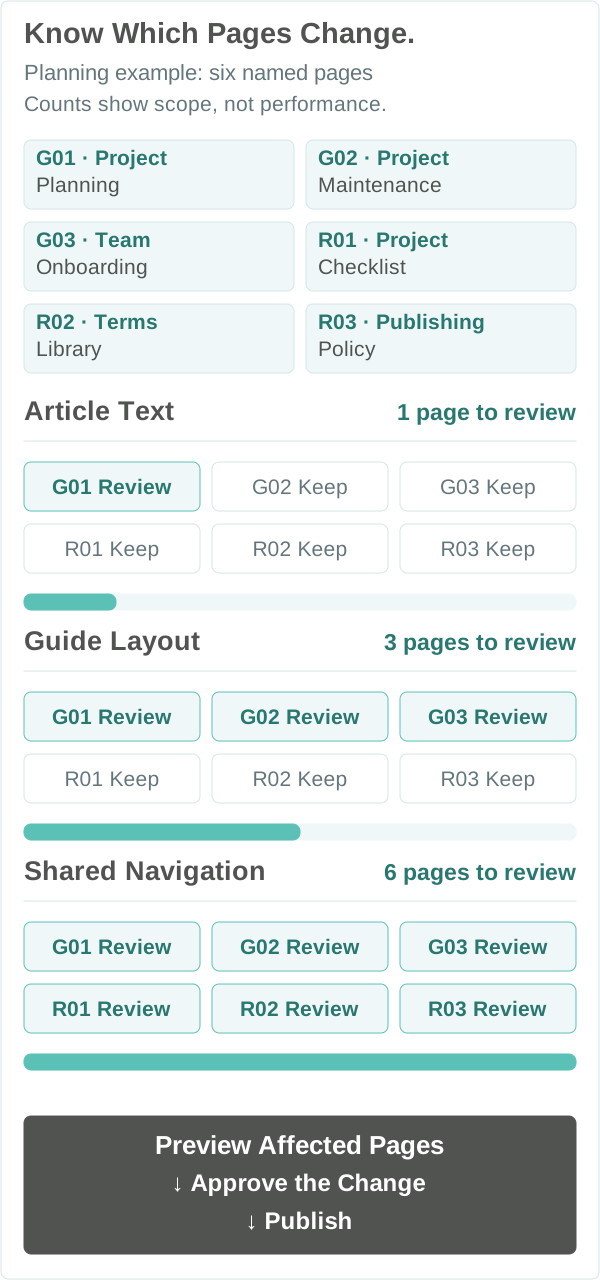
Six sample pages grouped into Guides and Resources. Article text affects G01, the Guide layout affects G01 through G03, and shared navigation affects all six. Each change requires preview and approval.Planning example with six named pages and three change scopes: one article, three Guides, or all six pages. Preview affected pages before approval.

When Individually Managed Pages May Be Simpler

For a small collection with infrequent changes or largely unrelated designs, individual pages may be simpler. The upfront modeling and import work makes sense when there is useful, repeatable publishing work to support.

The six example pages are G01 Project Planning, G02 Project Maintenance, and G03 Team Onboarding using the Guide layout, plus R01 Project Checklist, R02 Terms Library, and R03 Publishing Policy using the Resource layout.

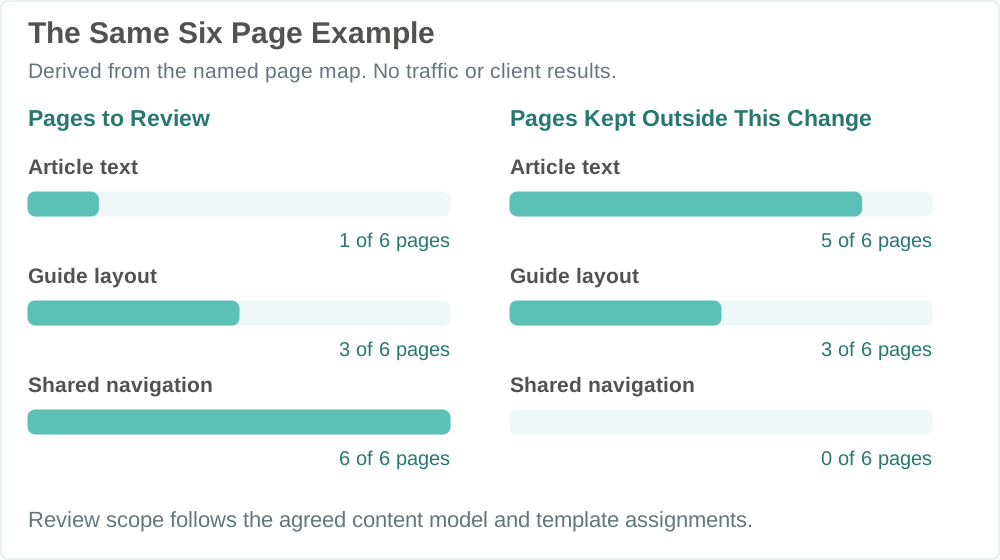
Of the six named example pages, an article edit requires reviewing one, a Guide layout change three, and a navigation change six. Five, three, and zero pages respectively remain outside each change.
A person holding two printed page layouts beside an open laptop

Review the Content and the Finished Page.

Editors review the content record. The assigned reviewer checks how the page renders and whether its links work. Agree who approves release for a new page or shared template change.

Content Is Accurate

Review the article and its supporting information.

Preview the Assigned Layout

Check layout, media, and required sections.

Check Navigation and Related Links

Verify categories, related content, and next steps.

Expertise Before Automation

Keep Editorial Control as Your Website Grows.

Agree who supplies the source information, verifies it, approves publication and corrects it later. If AI is included, decide which tasks it can assist with and who checks the output.

Name the Source and Owner

Identify who supplies each field and who can correct it. Confirm rights to imported text, images, and data.

Protect Reviewed Work

Agree which fields a source refresh may update and which edited content should be kept until a reviewer approves a change.

Define the Publishing Decision

Specify required content, optional sections, and the person who can release or hold a record. Test what editors will actually see.

Content Website Applications

Build Around the Content Your Audience Needs.

The right structure depends on what you publish and how people need to explore it.

Guides and Knowledge Hubs

Organize substantial guides and answers around a subject your audience needs. Related reading should help people move from an introduction to the next useful detail.

Editorial and Resource Sites

Give an ongoing publication consistent article layouts and useful ways to browse its archive. Distinct page designs and editor responsibilities should be planned together.

Directories and Information Libraries

Give each listing or resource information readers can act on, such as eligibility, location, hours or how to use it. Create a page when those details serve a distinct reader need.

If the content is thin, the pages need unrelated designs, or nobody can keep the information current, a smaller manually maintained site may be the better investment.

A Concrete Publishing Example

Decide Which Records to Publish, Update or Hold

Check a new record before creating its public page. Update an allowed summary field while keeping the editor’s approved article. Hold an incomplete refresh and keep the existing approved page available.

Planning Example · Proposed Import Decisions

Incoming Record

G04 · New Guide

An approved article is ready to add through the existing Guide layout. Check its required information and planned URL before creating the page.

The Decision

Map the approved article into its fields and assigned layout. Check for an existing equivalent page, preview the output, then approve publication.

Before Publication

Review a New Page

Preview the affected page and confirm the decision with the responsible reviewer.

Incoming Record

G02 · Existing Guide

The source summary has changed. The reviewed article text and existing URL should stay.

The Decision

Match the existing record, propose only the allowed summary update, and preview the finished page.

Before Publication

Update the Summary

Preview the affected page and confirm the decision with the responsible reviewer.

Incoming Record

R02 · Incomplete Source Update

The incoming Terms Library update is missing a required definition. An existing approved page should not be replaced with this incomplete information.

The Decision

Hold the incoming update. Keep any existing approved page unchanged while an editor supplies and approves the missing definition.

Before Publication

Hold the Update

Review a complete replacement before release. Confirm that the existing approved page is kept.

Check What a Second Import Changes or Holds

In the pilot, run a second import using stable source identifiers. Check that it matches existing records, changes only allowed fields, preserves approved edits and reports incomplete updates. Agree who can review a held update and release an approved version.

Website Build Scope and Handoff

Agree What the Build Includes and How to Check It

A Guide pilot can include fields, a shared layout and a source connection if agreed. Check that an editor can add and revise a guide, preview the page and verify its URL and links. The proposal explains what is included in the pilot and whether cleanup, migration, further page types or ongoing support are separate.

What Shapes the Scope

Content and Page Families

Existing content condition, missing media, distinct layouts, categories, and relationships determine the modeling and design work.

Imports and Existing URLs

A single import needs matching rules and checks on the resulting pages. Recurring refreshes also need clear source permissions, rules for which fields can change and someone to handle incomplete updates. Scope any URL changes separately.

What We Agree Before Starting

Responsibilities and Handoff

Identify who writes, verifies, approves, and maintains content. Define administration access, exports, documentation, licenses, and ongoing support in the proposal.

Build Timing and Future Work

Content readiness, access, design decisions, feedback, and migration testing affect the schedule. Publishing the site and gaining search visibility have different dependencies.

Discuss Your Website →

Measure Usefulness, Then Refine

Check Publishing, Discovery and Business Response Separately

Check whether the team can keep pages accurate and whether readers can find and use them. Where a page has a business goal, review the outcomes the available business records can confirm alongside the work required to maintain it.

Content and Publishing Reliability

Use actual import failures, missing content, duplicate records, and correction work to decide whether the publishing rules need improvement.

Search and Useful Visits

Review reported search activity and indexed status for relevant page groups. Check recorded visits and how readers navigate separately. A sitemap can help search engines discover URLs without ensuring they are crawled or indexed.

Inquiries and Business Fit

Where a page invites contact, review tracked actions separately from genuine inquiries that reached the team. Count each request once and use the business’s service and coverage criteria to check fit. Match confirmed customer outcomes only when the business records support it.

Use the Evidence to Choose What to Check Next

Publishing Evidence

An import fails, duplicates a record or overwrites approved work. Check which identifier matched, what fields the import changed and which records were held. Retest the affected cases before expanding.

Discovery Evidence

Useful pages are difficult to reach. Review navigation, links, and search access before commissioning more pages.

Business Feedback

Visitors reach the page but few suitable inquiries are confirmed. Check receipt before assessing fit. If a delivery test is in scope, have the intended team confirm it arrived. Use receiving records separately for genuine requests. If suitable requests arrive but stall, check who follows up.

Decide What to Fix, Extend or Pause

Review the findings with the people who maintain the site and handle inquiries. Agree whether the next change belongs in the content, the template, navigation or the contact route, and how to verify it.

Client Perspectives

What Our Clients Say

Clients describe working with Revenue Surge on websites, search and related marketing projects.

Dave provided a solid resource and “home” for my clients that needed direction and counsel on how to maximize their digital efforts from digital media strategies, SEO/SEM and optimal website/landing pages that convert...

John Bosacker

Lee MMS

Dave and his team never cease to amaze us with completion of every item on a Scope of Work as well as offering many additional services with fair pricing...

Lori Zeller

THOR Associates

Great experience working with Revenue Surge to not only build a website for my firm's real estate business but also consulting on effective logo design and SEO. Would absolutely recommend Dave and fully trust his expertise...

Shae Herman

Programmatic Website Questions

Questions About Programmatic Websites and SEO

See when shared templates fit, how to handle existing URLs and what your team can manage after launch.

Related SEO services: Technical SEO → · Organic SEO →

When Does a Programmatic Website Make Sense?
It makes sense when useful content shares repeatable structures and you need to publish or maintain a growing collection. Guides, editorial libraries, and information directories can fit. A small set of unrelated pages may be simpler to build individually. We review your content, page families, and publishing needs before recommending the scope.
What Content Would We Need?
One publishing question is enough to start. A public page link or example record without private details can help. If we agree on the work, we can review which source content is ready, who can authorize access and who approves any corrections or missing information.
Can You Work With Our Existing Website and Preserve Its URLs?
We first review what your current platform supports and which content and URLs should stay. When a URL must change, the plan needs an appropriate destination, redirect, internal link updates, and launch checks. Keeping the article text alone does not preserve every search signal. Significant migrations can cause search fluctuations, so the scope should include monitoring.
How Do You Keep Pages Useful and Distinct?
Each page needs information or an explanation that serves a real reader. Shared layouts provide consistent presentation while the article supplies its own substance. We plan useful page purposes, content requirements, and relationships, rather than treating a different title or place name as sufficient reason for another page.
Can We Redesign Without Rewriting Every Page?
Content stored in suitable fields can be presented through an updated shared template without rewriting the article library. We still test the pages assigned to that template. A new design may need extra fields, content changes, or migration work, so those requirements are identified before the change is applied.
Does a Larger Website Automatically Perform Better in Search?
A larger website still needs useful pages that readers and search engines can reach. Publication, indexing, rankings and business outcomes are separate. Google treats producing many pages primarily to manipulate search rankings as scaled content abuse, regardless of how those pages were made. Read Google’s policy →
Does Programmatic Publishing Require AI Written Articles?
No. Programmatic development organizes content and turns records into website pages using shared layouts and publishing rules. Articles can be written, edited, or imported from approved sources. AI can assist with agreed tasks, while subject expertise, source rights, and editorial approval remain necessary.
How Do Programmatic Development and SEO Work Together?
Development builds the content model, layouts, imports, and update rules that reduce repeated page assembly. SEO helps assess useful search opportunities, page purposes, internal links, and technical access. The publishing system can improve how the site is managed, while search performance and suitable inquiries require separate evaluation.
What Determines the Cost?
Content condition, the number of distinct page families, source connections, update rules, migration needs, and integrations shape the work. A clean library with one layout is different from a mixed archive requiring cleanup and several designs. We discuss these factors and define the included work in the proposal rather than pricing by URL count alone.
How Long Does a Build Take?
Timing depends on access, content readiness, design decisions, feedback, integrations, and testing. A representative pilot helps expose the work before expanding. Agree project milestones around those dependencies. Website publication and search visibility follow different timelines, and neither a launch date nor a ranking timeline is assumed before scoping.
What Access and Handoff Will Our Team Receive?
Agree which tasks your team will handle and who can perform them after launch. The proposal defines account and asset ownership, permissions, available exports, documentation, license terms and support. Where handoff testing is included, confirm the intended editor can perform an agreed task.
Who Maintains the Website After Launch?
Content editing, fact checking, software care, recurring imports, template changes, and ongoing SEO are different responsibilities. We agree which work your team handles and which support belongs in the engagement. Name the content approver and the person responsible for correcting outdated information, rather than assuming automation keeps every page current.

Publishing at Scale

Start with One Website or Publishing Question

Tell us what you want to build, expand or redesign. Share a public page link or example record without private details if it helps. We can discuss what to check before choosing a shared structure.